The best radial menu apps for Mac
Last updated
A radial menu opens a ring of actions around your pointer: hold a key, flick toward a slice, let go. On a Mac, the apps that do this split into two groups. Some fill the ring with things you set up yourself, like other apps' shortcuts, scripts and links. Others come with their own tools. Here are the ones worth trying, with what goes in each ring and what it costs. We make Helix, so weigh that pick accordingly.
At a glance
| What goes in the ring | Price | |
|---|---|---|
| Pie Menu | The active app's keyboard shortcuts | $39.99 once or $19.99 a year |
| Radial | Apps, links, shortcuts, snippets, scripts and macros | €19.99 once, up to 5 Macs |
| Invoke | Apps, folders, text, shortcuts, plus clipboard history and a color picker | Free, Pro $6.99 once |
| Orbs | 14 built-in tools, apps, snippets, shell commands and Shortcuts | $9.99 once |
| Pieoneer | Apps, folders, documents, other apps' shortcuts and music controls | $14.99 once |
| Vorssaint | Apps, files, shortcuts and its own small tools | Free, open source |
| Kando | Apps, links, shortcuts and commands, on Mac, Windows and Linux | Free, open source |
| Helix | 16 built-in tools: apps, music, clipboard, notes, AI and more | $9₹899 once |
Pie Menu
Puts the keyboard shortcuts of the app you're using into a ring, with a different menu for each app and submenus inside them. You can use SF Symbols, your own images or emoji as icons, and share themes. Good if you live in a few apps like Figma or Photoshop and want their shortcuts under your pointer. $39.99 once or $19.99 a year on the Mac App Store, or in Setapp, with a 7-day trial. Needs macOS 13 or later.
Radial
The most powerful one for automation, from AppVerge. Its menus open apps, files and links, press shortcuts, insert snippets, run AppleScript and shell scripts, and chain steps into macros, and they change with the app in front. It opens from held modifier keys, a shortcut, hot corners or a mouse button. €19.99 once for up to 5 Macs, with a 7-day trial. Needs macOS 15 Sequoia or later.
Invoke
A newer radial launcher on the Mac App Store. It opens apps, folders and websites, pastes text, presses shortcuts and runs Apple Shortcuts, and it has a few tools of its own: clipboard history, a color picker, music controls and break reminders. Menus can change with the front app. It's free to download, and Pro is $6.99 once, with a 14-day Pro trial. Needs macOS 13 or later.
Orbs
Inspired by game weapon wheels, like Helix. Hold ⌥⇧, flick, let go. It has 14 tools of its own, such as a timer, calculator, clipboard, color picker and magnifier, and it can also open apps, type snippets, run shell commands and macOS Shortcuts, with nested menus. $9.99 once, sold on its own site. Needs macOS 14 or later.
Pieoneer
A radial launcher from App ahead for apps, folders and documents, with a switcher for running apps, a ring that presses another app's shortcuts and a remote for Apple Music and Spotify. It works fully from the keyboard. $14.99 once on the Mac App Store. Needs macOS 15.6 or later, and its last update was in April 2026.
Vorssaint
A free, open-source menu bar toolkit where the radial menu is one of the tools you can install. Its ring holds apps, files and shortcuts, plus small tools like Keep Awake, window layouts and a Now Playing card, with a profile per shortcut. It opens from a key, a mouse button or a four-finger tap. Free, with frequent updates. Apple silicon and macOS 14 or later.
Kando
A free, open-source pie menu that also runs on Windows and Linux, so it suits you if you switch computers. You build its menus from apps, links, shortcuts and commands, and it's very customizable in how it looks. It isn't a native Mac app, so it feels less at home than the others.
Helix
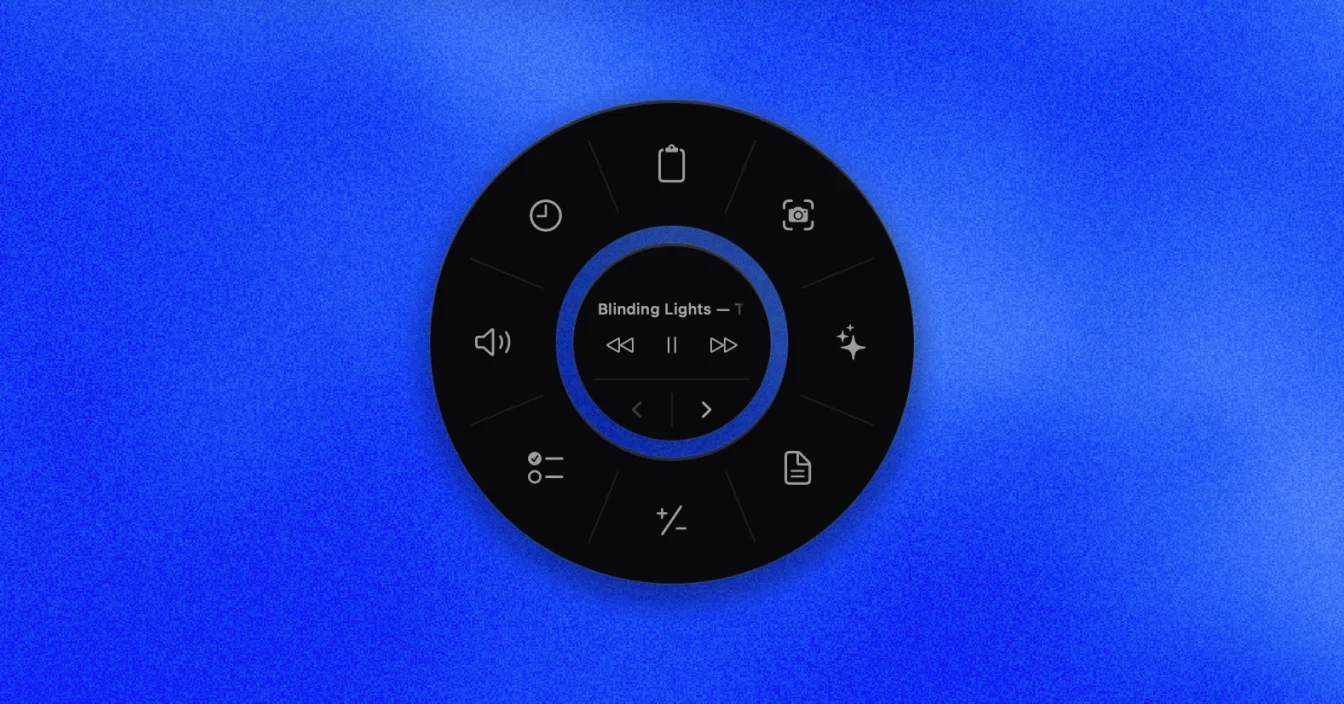
Where most of these trigger what your Mac and your apps already do, Helix brings its own tools. Hold ⌥Space and the ring opens your pinned apps, shows the song and playback while Spotify or Apple Music plays, and has clipboard history, notes, timers, screenshots, screen recording, a color picker, window snapping and Ask AI. A tool's options fan out on an outer ring, like Clock's timer, stopwatch, Pomodoro and alarm.
It's the same in every app with nothing to set up, but you can't add your own shortcuts or scripts. $9₹899 once. Needs macOS 14 or later.
Which one to pick
If you want shortcuts for one app at a time, Pie Menu. If you want to automate, Radial. If you want free, Vorssaint, or Kando if you also use Windows or Linux. If you want a ring that already does useful things the moment you install it, Orbs or Helix.
Prices are from each app's website or App Store page in November 2026 and can differ by region.
Questions
Which ones come with their own tools?
Helix has 16, including clipboard history, screenshots, screen recording, notes, timers and Ask AI. Orbs has 14, such as a timer, calculator, clipboard and color picker. Invoke has clipboard history, a color picker and music controls. Helix is $9 once.
Helix is a one-time purchase for macOS 14 or later, with 16 tools in one ring. See how it works, or try it free for 7 days.
Buy HelixMore from the blog
- Helix vs Raycast: pointing vs typing on your Mac
- Helix vs Alfred: two ways to reach your Mac's tools
- Helix vs Paste: clipboard history compared
- Helix vs Pie Menu: two radial menus for Mac
- The best Raycast alternatives for Mac
- The best Alfred alternatives for Mac
- The best Paste alternatives for Mac
- The best Pie Menu alternatives for Mac
- The best clipboard managers for Mac
- How to see your clipboard history on a Mac
- How to snap windows on a Mac
- How to pick a color from your screen on a Mac
- How to ask ChatGPT or Claude from anywhere on your Mac
- How to use a Pomodoro timer on your Mac